Merchant Onboarding Automation in Zoho CRM
Z-Crew Technologies built a merchant onboarding process in Zoho CRM for Doodle Worldwide. It takes a merchant from a converted lead to an e-signed agreement, collected documents, and go-live, leaving only three steps that need an admin.

Client: Doodle Worldwide
At a Glance
- Customer
- Doodle Worldwide DMCC (doodleworldwide.com)
- Industry
- Loyalty programs and digital marketing
- Location
- Jumeirah Lakes Towers, Dubai, UAE
- Zoho products
- Zoho One: Zoho CRM, Zoho Sign, Zoho Forms, Zoho Writer
- Users
- 5 Zoho CRM users
- Scope
- Merchant onboarding in Zoho CRM, from lead to go-live
- Partner
- Z-Crew Technologies, Zoho Authorized Partner, Dubai
- Status
- Built and tested end to end in October 2026; rolling out to all deals
About Doodle Worldwide
Doodle is a digital-first agency that does it all, from brand partnerships to tech solutions and end-to-end digital marketing. Since 2009, we’ve been helping brands grow, scale, and connect with their audiences while boosting visibility and revenue.
Doodle partner network spans more than 2,000 merchants over 5,000 locations across the UAE, from restaurants, cafes, entertainment venues, theme parks, retail chains, online shopping, service providers and more (source). Every new merchant needs an approved deal, a signed agreement, and a set of documents before its offers can go live.
The Challenge
Merchant onboarding ran on Excel, Tally, and email, so every hand-off between sales, approvers and the merchant cost time and invited errors.
No single view of a deal. Merchant deals lived in spreadsheets, so nobody could see at a glance which merchants were waiting on approval, a signature, or documents.
Agreements made by hand. Each agreement meant copying merchant details into a template, emailing it for signature, chasing it, and filing the signed copy.
Documents chased over email. Trade licenses, logos, offer images, and voucher codes arrived in different formats and had to be re-typed into the records.
Informal approvals. There was no fixed owner for each step and no record of why a deal was sent back.
Disconnected systems. Accounting sat in Tally, separate from the sales data.
The result was lost time, data-entry errors, and delays in getting merchants and their offers live.
The Case Study
Z-Crew made Zoho CRM the hub of merchant onboarding, with Zoho Writer, Zoho Sign and Zoho Forms connected to it. A deal now moves through each stage on its own, and people step in only to approve, review documents, and set the merchant live.
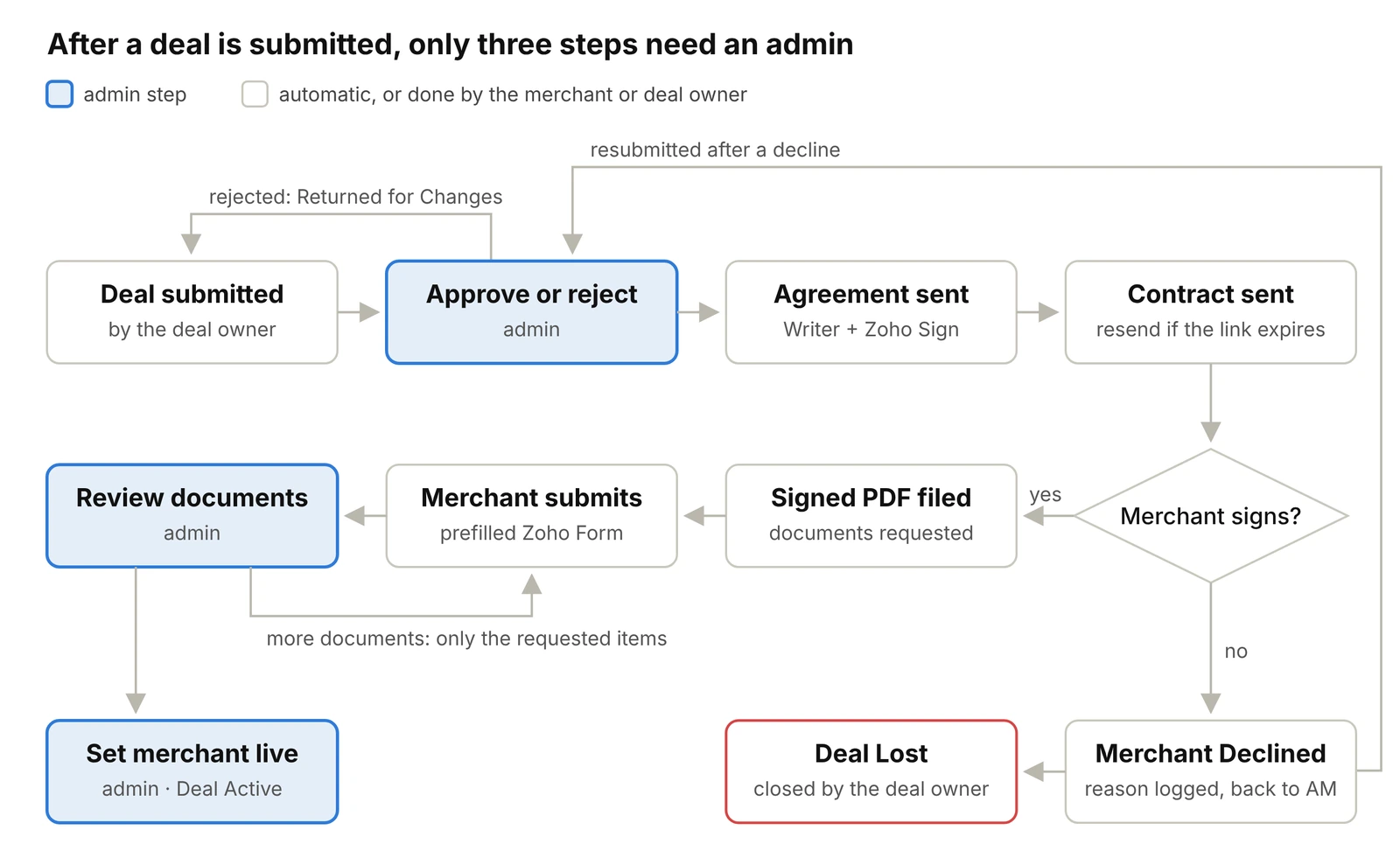
Scroll sideways to see the whole flow.
Approval blueprint. A Zoho CRM Blueprint on the Deals module has 11 stages and 13 transitions, from "Deal Created" to "Deal Active".
- Each transition has an owner: the deal owner submits, resubmits, or closes a declined deal; only admins approve, reject, request more documents, or set a deal live.
- Three loops are built in: a rejected deal goes to "Returned for Changes", a declined agreement goes to "Merchant Declined", and a request for more documents goes to "More Documents Needed".
- Before a deal can be submitted, the deal owner fills in the authorized signatory, the contract period in months, and the platforms the merchant opts into (1 to 3 of Smiles, Etisalat Money, and Roam Pass), with the offer for each.
- A rejection reason and a message for the merchant on each request for more documents are mandatory, and documents can only be accepted once Document Status is "Submitted".
- Stage names show the status and what happens next, such as "Contract Sent (Awaiting Signature)" and "Contract Signed (Awaiting Documents)".
Agreements generated and sent automatically. When a deal is approved, a Deluge function merges the deal into a 3-page Zoho Writer partnership agreement and sends it through Zoho Sign to the merchant's Authorised Signatory.
- The term sheet ticks the platforms the merchant opted into, shows the offer for each, and states the contract period.
- The function saves the Sign Request ID, the date sent, and a unique deal reference, then moves the deal to "Contract Sent (Awaiting Signature)".
- If the agreement needs to change, an admin clicks Resend Agreement. The old signing request is cancelled, the updated agreement goes out, and a note is added to the deal.
- If the signatory email is missing or sending fails, it adds a note to the deal and leaves the stage unchanged.
Signatures tracked back into CRM. A Zoho Sign webhook calls a CRM REST API function for every signing event.
- Signed: it attaches the signed PDF to the deal, records the signed date, sets the agreement expiry date (signed date plus the contract period), marks documents as requested, and moves the deal to "Contract Signed (Awaiting Documents)". The merchant gets the document request straight away.
- Declined: it saves the merchant's reason, adds a note, and moves the deal to "Merchant Declined". The deal owner then resubmits it with changes or closes it as Deal Lost.
- Link expired: it records the expiry date, adds a note, and alerts the account manager, deal owner, and approver so an admin can resend the agreement.
Documents collected with Zoho Forms. The merchant gets a link to one Zoho Form from a CRM email. The form opens with the deal reference filled in and locked.
- It collects the trade license and its expiry date, brand logo, offer images, brand video, website or app link, voucher codes and their validity, and the merchant type.
- Outlets can be entered in the form, up to 5 with address, city, phone number, and Google Maps pin, or uploaded as an Excel list.
- Each submission updates the existing deal by its deal reference, with 7 fields, 6 file uploads, and the outlet table mapped. Empty answers never overwrite data already in CRM, so no duplicate records are created.
Requests for more documents. When an admin clicks Request More Documents, they tick the items needed and add a message for the merchant.
- The email link opens the same form with the requested items, the message and the merchant type filled in and shows only the requested sections.
- Earlier uploads stay on the deal, and new files are added beside them.
Automatic move on submission. When Document Status changes to "Submitted", a workflow rule records the date, creates a review task, emails the admin, and moves the deal to "Documents Received (Under Review)". In testing, the deal moved within 2 seconds of the form being submitted.
- Review tasks close themselves when the admin requests more documents or sets the deal live.
- Setting a deal live moves it to "Deal Active", marks the documents as approved, locks the record, and sends the "Merchant is live" email.
Emails and reminders. 15 email templates keep the approver, account manager, deal owner, and merchant informed at each step: submission, approval or rejection, agreement sent, declined, link expired, agreement executed, document request, more documents, documents submitted, and go-live.
- Reminders run on their own: approval reminders after 24 hours, escalations after 48 and 72 hours, a reminder for unsigned agreements, and document reminders on days 1, 3, 5, and 7 after signing.
- Renewal reminders go out 30 and 15 days before an agreement expires and 1 and 3 days after.
Secure data model. Custom deal fields track document status, contract period, opted-in platforms and offers, agreement dates, remarks, and each uploaded document. OAuth connections use only the scopes each integration needs, and every agreement is tracked inside CRM through the Zoho Sign Documents module.
Access and Controls
The second phase added controls for aggregators, the partners who bring merchants to Doodle.
Leads to deals only. Aggregators create leads and convert them to deals. They pick the company and contact from existing records and can't create new ones.
Own merchants only. Leads and deals are private to their owner, so each aggregator sees only their own merchants, while admins see everything.
Stage locked. A function-based validation rule makes every new deal start at "Deal Created" and stops aggregators changing the stage by editing the deal. They move a deal only with the blueprint buttons.
Record locking. Once the agreement is signed, aggregators can edit only the document fields of the deal. Admin profiles are not locked.
Internal fields hidden. The account manager field is hidden from aggregators, and they have no mass update, mass delete, or mass transfer rights.
Data quality. Brand names must be unique on leads, so the same merchant can't be entered twice. Mandatory fields are checked at each transition, the account manager's email is filled in from the AM name, and contract IDs are created for every new deal.
Rollout and testing. Z-Crew migrated Doodle's leads, deals, companies, and contacts from Excel into Zoho CRM, where new ones are now added. Before rollout, a test deal ran through the whole process, including a rejection, a resent agreement, a merchant decline, repeated requests for more documents, and go-live. At go-live, all open merchant deals move into the new process, and Z-Crew trains the account managers, aggregators, and approvers. Z-Crew also set up Zoho Books for UAE VAT.
Business Outcomes
Onboarding now needs an admin at only three points: approving or rejecting the deal, reviewing documents, and setting the merchant live. Everything else runs automatically, from agreements and signatures to document requests and reminders.
Lead to live
Built and testedOne connected flow from lead to go-live, with stage changes and emails automated wherever no decision is needed
Agreement sent after approval
Measured in testingWithin 5 seconds, with no manual step
Signed agreement filed
Measured in testingSigned PDF attached, signed and expiry dates set and documents requested within 5 seconds of the signature reaching CRM
Stage update after documents are submitted
Measured in testingWithin 2 seconds, with no manual update
Manual hand-offs
Built and testedReduced to 3: approve, review documents, set live
Merchant declines
Built and testedReason captured, and the deal sent back to the deal owner to revise or close
Resubmitting documents
Built and testedThe merchant sees only the requested items, and earlier uploads are kept
Follow-ups
BuiltReminders and escalations for approvals, signatures, documents, and renewals run on their own
Data access
Built and testedEach aggregator sees only their own merchants, can't change a stage by hand, and can't edit a signed deal except its documents
Duplicate merchants
BuiltBlocked by a unique Brand Name on leads
What Doodle Says
“Bringing a merchant onboard used to mean multiple spreadsheets, long email threads, and chasing for signatures and documents. Now a deal moves automatically from approval to a signed agreement to online document collection with least friction. Our team steps in only where a decision is needed. Thanks to the ZCrew team for simplifying the merchant onboarding process for us.”
About Z-Crew Technologies
Z-Crew Technologies is a Zoho Authorized Partner in Jumeirah Lakes Towers, Dubai. It implements Zoho CRM, Zoho Books, Zoho Creator, and Zoho One around the way UAE businesses actually work.
Sources: company details from doodleworldwide.com; project details and test results from Z-Crew Technologies.
Want approvals, agreements, and onboarding to run themselves in Zoho CRM?
or email info@z-crewtech.com